
Standing Desk vs Sitting Desk: Which is Better for Back Health?
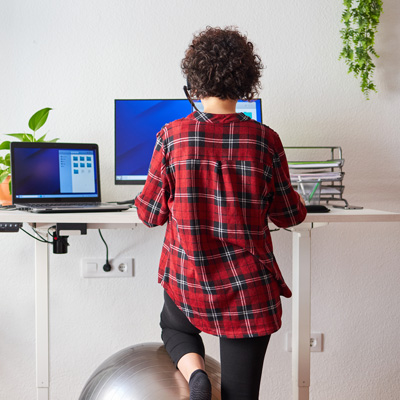
The standing vs sitting argument is the wrong fight, and the research agrees.
Millions of office workers spend eight to ten hours a day at a computer, and plenty buy a standing desk expecting the aching to stop. Some feel better. Some feel worse. Most quietly go back to sitting.
This guide covers what each desk does, what the evidence shows, when to stand, when to sit, and why the thing that helps most costs nothing. At Chiropractic Care Centre in South Tampa, we also see how long hours at a desk can contribute to recurring neck and back discomfort.
What is a standing desk?
A standing desk raises your work surface to standing height so you can work upright. Your hips open, your weight moves through your legs, and small shifts keep the muscles around your spine active instead of switched off. Most people use a standing desk for part of the day rather than all of it.
Three kinds exist. A fixed model sits permanently at standing height. An adjustable model raises and lowers by crank, lever, or motor. A sit-stand desk, or a converter sitting on top of a traditional desk, does the same job for less. A treadmill desk adds slow walking, which suits some jobs and ruins others.
What does a regular desk do well?
A regular desk is not the villain here. Sitting is stable, it supports fine motor skills for detailed computer work, and with a good chair it gives your lower back real support that standing cannot match.
The trouble is what people do in the seat. Four mistakes account for most of it: slouching into a C shape, pushing the head toward a low monitor, crossing the same leg for hours, and a screen below eye level so you hunch all afternoon. None of those are the desk’s fault.
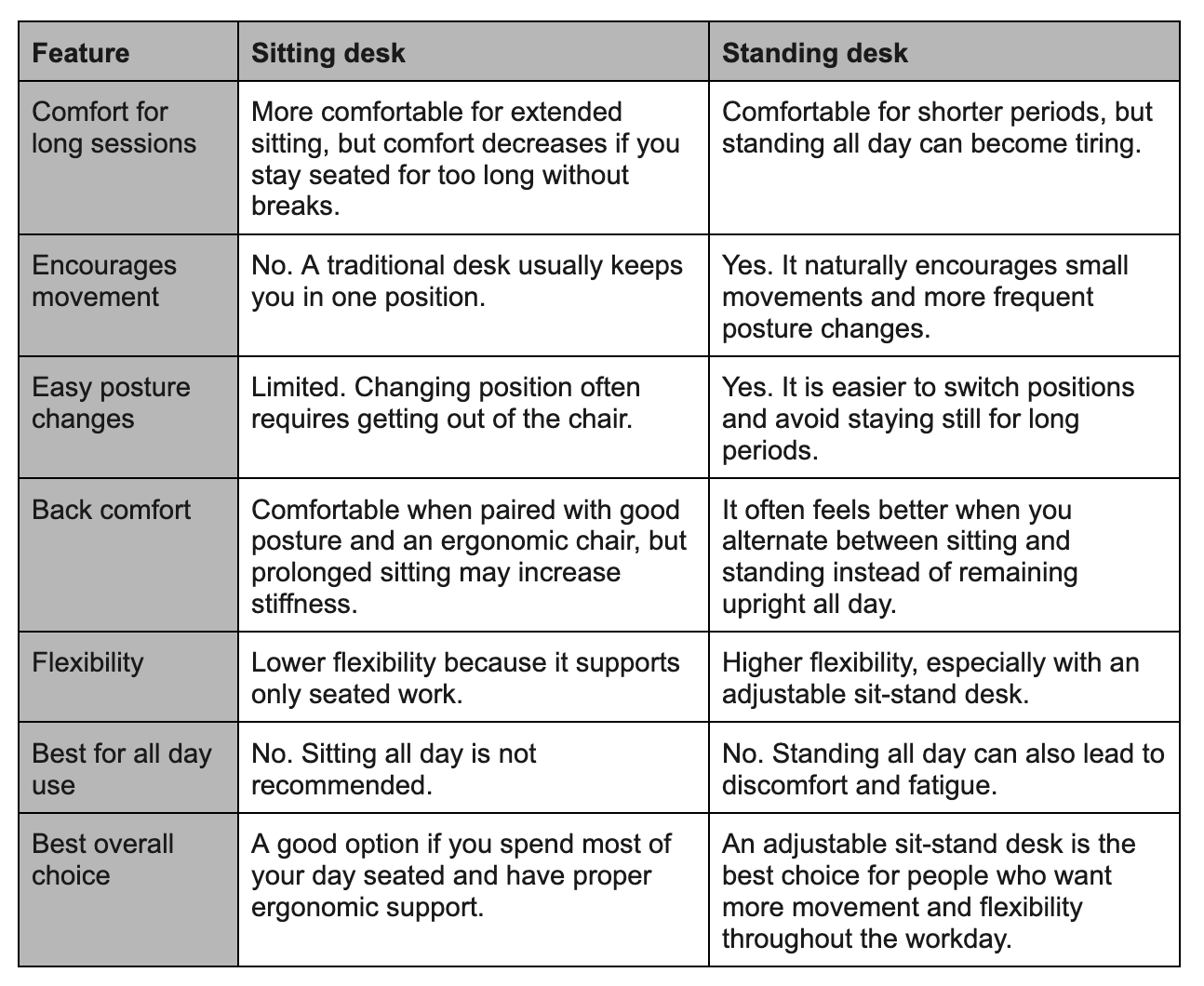
Benefits of using a standing desk
Less prolonged sitting. This is the clearest win a standing desk gives you. A 2018 Cochrane systematic review found people using these desks sat between 30 minutes and two hours less per day than colleagues at conventional desks.
Easier neutral posture. Standing opens the hips and helps preserve the natural curve of the low back, which takes load off the discs.
Better circulation. Standing keeps the leg muscles working, which moves blood rather than letting it pool.
More energy. Many report a steadier afternoon, though productivity measures about the same either way.
Less stiffness. You fidget when you stand, and that small constant movement does more good than the standing itself.
Now the honest part. That same Cochrane review rated the evidence as low quality and concluded the health effects are still unproven. The calorie story is worth deflating too. Standing burns roughly eight more calories an hour than sitting, which works out to about 64 across a full workday. That is a banana, not a workout.
Drawbacks of standing too much
You cannot stand all day any more than you can sit all day. Standing swaps one set of problems for another.
Leg fatigue. Static standing tires the calves and thighs faster than people expect.
Sore feet. Hard floors are unforgiving. An anti fatigue mat helps more than better shoes.
Low back strain. Locked knees and a tipped pelvis load the lower spine, and the ache arrives by mid afternoon.
Circulation complaints. Prolonged static standing is a known occupational risk, though the desk trials themselves did not find harm.
The point is not that standing is bad. Eight hours of anything is bad, and swapping one frozen position for another solves nothing.
Benefits of sitting when done correctly
Sitting is less tiring, full stop. It gives your hands a stable base, which matters for detailed work and anything needing precision. A chair with real lumbar support holds your spine in a position standing cannot replicate.
Sitting is not the problem. Sitting all day without moving is the problem.
Tips for creating an ergonomic workstation
- Monitor height. Top of the screen at or just below eye level, about an arm’s length away.
- Keyboard position. Close enough that your elbows stay near your sides and your wrists run straight.
- Chair support. Lower back supported, hips slightly above knees.
- Foot placement. Both feet flat, on the floor or a footrest.
- Standing desk height. Elbows at roughly 90 degrees, shoulders relaxed, not shrugged.
- Anti fatigue mat. Worth every dollar if you stand more than an hour at a stretch.
- Walking breaks. Two minutes an hour beats one long walk at lunch.
Which desk suits people with back pain?
That depends on what is causing it, and a desk changes your habits, not your structure.
Herniated disc. Sitting loads the discs more than standing, so standing often feels better. Standing too long undoes that, which is why switching matters more than choosing.
Sciatica. It flares after long periods in any one position. Position changes and short walks beat committing to either extreme.
Neck strain. Screen height matters far more than desk type. A standing desk helps only if the monitor comes up with you.
Shoulder tension. Comes from raised shoulders and reaching for the mouse. Keyboard distance matters more than whether you stand.
Old habits. Built over years from how you sit, muscle weakness, and how your spine moves. No desk corrects that.
If your posture keeps getting worse, or the pain returns every single day, that is worth a professional look rather than another shopping decision.
See more: Signs Your Pain Is Becoming Chronic
How chiropractic care can help office workers
Chiropractic care looks beyond where the pain is felt to identify how posture, joint movement, muscle tension, and daily work habits may be contributing to it.
At Chiropractic Care Centre in South Tampa, care begins with an evaluation of your posture, spinal motion, range of movement, and symptoms. Depending on the findings, your plan may include chiropractic adjustments to improve joint mobility, rehabilitation exercises to support strength and flexibility, and practical changes to your workstation.
The goal is not simply to provide temporary relief, but to address the factors that keep putting stress on your neck and back throughout the workday.
When desk changes are not enough
A better chair, a higher monitor, and more movement throughout the day can reduce the strain of desk work. But if neck or back pain lasts more than a few weeks, keeps returning, affects sleep, or comes with tingling or numbness into an arm, it may be time to get it evaluated.
Weakness in a limb, symptoms after a fall or crash, or an unexplained fever should be evaluated by a physician first.
Dr. C. Dean Brown has been caring for patients in the Tampa area since 2002 and has completed extensive postdoctoral training in spine disorders and spinal rehabilitation. If desk-related pain continues despite changes to your workstation, contact us to schedule an evaluation.
Frequently asked questions
Is a standing desk better than a regular one?
Neither wins outright. The best setup is the one that lets you switch easily, which is why sit-stand models are the practical choice for most people.
How long should I stand at work?
Start with 15 to 30 minutes at a time and build up. Most people do well between two and four hours of standing across a day.
Should I alternate between sitting and standing?
Yes, and that is the single most useful thing in this article. Alternating between sitting and standing beats committing to either one.
What is the healthiest desk setup?
A desk that allows both positions, a screen at the right height, a chair that supports your lower back, and a two minute walk every hour. The walk matters most.